
| 일 | 월 | 화 | 수 | 목 | 금 | 토 |
|---|---|---|---|---|---|---|
| 1 | 2 | 3 | 4 | 5 | 6 | |
| 7 | 8 | 9 | 10 | 11 | 12 | 13 |
| 14 | 15 | 16 | 17 | 18 | 19 | 20 |
| 21 | 22 | 23 | 24 | 25 | 26 | 27 |
| 28 | 29 | 30 |
- JPA
- 엘라스틱서치
- kibana
- 알고리즘
- javascript
- Web
- java8
- nodejs
- Spring Boot
- 백준
- 자바스크립트
- error
- MySQL
- 자바
- 독후감
- boot
- Spring
- java
- effective
- 맛집
- node
- Git
- RCP
- jface
- 후기
- 이펙티브
- 인터페이스
- 리뷰
- elasticsearch
- 스프링
- Today
- Total
wedul
spring metrics sever, client max-uri-tags 본문
회사에서 사용하고 있는 서버가 파일관련 서버이다 보니 조건이 많아 호출에 대한 종류가 생각보다 많았다.
호출되는 api도 mvc server endpoint도 100개가 넘었고 내부에서 webclient로 호출하는 외부 api client도 100개가 넘었다.
어느날 새로운 api가 개발이 되고 선 배포 된 이후 실제 배포일자가 되서 호출이 되었는데 metric정보를 찾을수가 없었다. 처음에는 exporter에서 관련 tags cardinality가 높아서 정상 수집이 안되나 확인해봤지만 이슈가 없었고 각 서버에 들어가서 /actuator/prometheus를 통해 수집되는 메트릭 지표를 확인해봤는데 해당 endpoint가 없었다.
하나의 서버에서 이렇게 많은 api를 호출하는것도 호출받는것도 처음이어서 이부분을 모르고 있었다. 기존 팀에서도 해당 지표를 보기보다 모두 커스텀 메트릭으로 저장하고 있어서 해당 부분에 대한 탐지는 내가 그라파나를 추가하면서 드러나게 되었다.
관련해서 현상 확인을 정확하게 하기위해 테스트를 진행해봤다.
end point 100개 이상 생성
package com.wedul.study;

import org.springframework.web.bind.annotation.ResponseBody;
import org.springframework.web.bind.annotation.RestController;

@RestController
public class DefaultController {

    @ResponseBody
    public String handle() {
        return "wedul";
    }

}


package com.wedul.study;

import org.springframework.beans.factory.annotation.Qualifier;
import org.springframework.boot.ApplicationRunner;
import org.springframework.context.annotation.Bean;
import org.springframework.context.annotation.Configuration;
import org.springframework.web.bind.annotation.RequestMethod;
import org.springframework.web.servlet.mvc.method.RequestMappingInfo;
import org.springframework.web.servlet.mvc.method.annotation.RequestMappingHandlerMapping;

import java.lang.reflect.Method;

@Configuration
public class DynamicMappingConfiguration {

    @Bean
    public ApplicationRunner registerMappings(
            @Qualifier("requestMappingHandlerMapping")
            RequestMappingHandlerMapping handlerMapping,
            DefaultController defaultController
    ) {
        return args -> {
            Method method = DefaultController.class.getMethod("handle");

            for (int i = 0; i < 110; i++) {
                RequestMappingInfo info = RequestMappingInfo
                        .paths("/test/" + i)
                        .methods(RequestMethod.GET)
                        .build();
                handlerMapping.registerMapping(info, defaultController, method);
            }
        };
    }

}
RequestMapping을 하나씩 생성하는건 안되고 handlerMapping을 만들어서 추가해주는 방식으로 진행했다.
application.yml
spring:
  application:
    name: study
management:
  endpoints:
    web:
      exposure:
        include: prometheus
  prometheus:
    metrics:
      export:
        enabled: true
metric정보를 볼수 있도록 관련 설정도 추가해줬다.
테스트 코드
package com.wedul.study;

import org.junit.jupiter.api.Test;
import org.springframework.boot.test.context.SpringBootTest;
import org.springframework.web.client.RestTemplate;

@SpringBootTest
public class UriEndpointTest {

    private final RestTemplate restTemplate = new RestTemplate();

    @Test
    void test() {
        for (int i = 0; i < 110; i++) {
            String url = "http://localhost:8080/test/" + i;
            restTemplate.getForObject(url, String.class);
        }
    }

}
100개를 넘겨서 호출할수 있도록 110개의 enpoint를 모두 호출 했다.
돌리고 확인해보니 실제 운영에서 겪었었던 것 처럼 동일하게 endpoint가 모두 노출되지 않았다.

로그를 확인해보니 다음과 같은 에러를 확인 할수 있었고

2026-01-23T22:35:14.543+09:00 WARN 17171 --- [study] [nio-8080-exec-9] .s.b.m.m.MaximumAllowableTagsMeterFilter : Reached the maximum number of 'uri' tags for 'http.server.requests'.
spring 문서나 설정되어있는 기본 config를 보면 100으로 설정되어있는걸 확인할 수 있다. (server, client)
management.metrics.web.client.max-uri-tags=100 # Maximum number of unique URI tag values allowed. After the max number of tag values is reached, metrics with additional tag values are denied by filter.
이걸 110으로 수정하고 돌려보면 잘 수집되고 에러메시지도 없는걸 확인 할 수 있다.
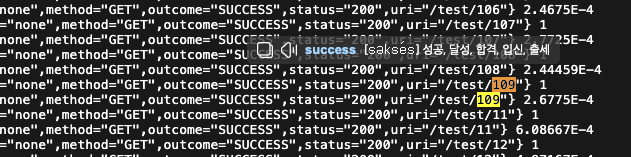
지표가 무작정 많이 수집되는건 여러 영향을 줄수 있기 때문에 크기를 어느정도 설정할지에 대해서는 잘 판단하는게 좋을 것 같다. 하지만 이설정이 누락되어서 관련 지표나 알림이 누락될 수 있으니 사전에 확인하는게 좋을 것 같다.
Appendix A. Common application properties
Appendix A. Common application properties Various properties can be specified inside your application.properties file, inside your application.yml file, or as command line switches. This appendix provides a list of common Spring Boot properties and refer
docs.spring.io
https://github.com/spring-projects/spring-boot/wiki/Spring-Boot-2.1.0-M3-Configuration-Changelog
'web > Spring' 카테고리의 다른 글
| jooq 사용 시 aop를 사용하는 경우에 application loading이 오래걸리는 이유 (0) | 2026.01.24 |
|---|---|
| swagger OpenApiCustomizer를 사용하여 커스텀 하기 (1) | 2025.05.18 |
| lettuce pipeline코드 사용시 커넥션 풀 사용 필요 (0) | 2024.06.08 |
| spring batch에서 파라미터 시 - 사용 주의 (0) | 2024.05.07 |
| MapStruct의 mapping방식과 Lobmok 함께 사용 시 값이 mapping되지 않는 이유 (0) | 2023.03.27 |

