
| 일 | 월 | 화 | 수 | 목 | 금 | 토 |
|---|---|---|---|---|---|---|
| 1 | 2 | 3 | 4 | 5 | 6 | |
| 7 | 8 | 9 | 10 | 11 | 12 | 13 |
| 14 | 15 | 16 | 17 | 18 | 19 | 20 |
| 21 | 22 | 23 | 24 | 25 | 26 | 27 |
| 28 | 29 | 30 |
- RCP
- 맛집
- 자바스크립트
- boot
- 스프링
- kibana
- 자바
- Spring Boot
- Web
- 인터페이스
- 후기
- 리뷰
- MySQL
- JPA
- nodejs
- Git
- node
- 이펙티브
- effective
- jface
- Spring
- 독후감
- error
- 엘라스틱서치
- javascript
- java8
- java
- elasticsearch
- 알고리즘
- 백준
- Today
- Total
wedul
jooq 사용 시 aop를 사용하는 경우에 application loading이 오래걸리는 이유 본문
회사에서 jpa를 사용하고 있지 않고 기존에 spring-data-jdbc를 사용하고 있었다. 그리고 대부분은 findById, findAll을 제외한 쿼리는 @Query annotaion을 붙여서 사용하고 있었다.
팀의 다른 프로젝트들이 mybatis, ibatis를 사용하고 있다보니 그대로 쿼리만 가져와서 spring data jdbc를 사용하도록만 바꾼 것 같다. mybatis가 나쁜건 아니지만 런타임시가 아니면 에러를 확인하기도 어렵고 값 매핑도 어렵다 보니 요새는 많이 선호하지 않아서 바꾼것 같은데 사실 annotaion으로 쿼리를 사용한다면 그것도 크게 다르지 않다고 본다.
그래서 입사 후 jooq나 query dsl 형태의 dsl 구조를 도입해서 컴파일 단위에서 타입 세이프한 쿼리를 사용할 수 있도록 기반을 만들고 있다.
그런데 예전에 많이 사용했었던 query-dsl의 경우 엔티티 기반으로 코드를 만들다 보니 Jpa 없이 사용하기가 애매해서 jooq를 사용하기로 했다. jooq는 db schema를 기준으로 코드를 만들다 보니 entity 클래스가 따로 없는 상황에서는 이게 더 컬럼/타입 관리가 편하게 느껴졌다.
그래서 jooq를 도입해서 코드로 쿼리를 짜는 편안함으로 작업을 다하고 나서 애플리케이션 배포를 했는데 애플리케이션 배포가 너무 느렸다.
현상을 확인해보기 위해 디버깅을 해보니 AOP관련 타겟 클래스를 스캔하는 영역으로 의심되는 부분에서 시간이 오래걸렸다. 그래서 테스트를 위해 임시 프로젝트를 만들었다.
테스트
CREATE TABLE member
(
    id         BIGINT AUTO_INCREMENT PRIMARY KEY,
    email      VARCHAR(100) NOT NULL,
    name       VARCHAR(50)  NOT NULL,
    created_at TIMESTAMP DEFAULT CURRENT_TIMESTAMP
);

CREATE UNIQUE INDEX ux_member_email ON member (email);

CREATE TABLE student
(
    id         BIGINT AUTO_INCREMENT PRIMARY KEY,
    name       VARCHAR(50)  NOT NULL,
    class     VARCHAR(20)  NOT NULL,
    created_at TIMESTAMP DEFAULT CURRENT_TIMESTAMP
);


CREATE table classs
(
    id         BIGINT AUTO_INCREMENT PRIMARY KEY,
    name       VARCHAR(50)  NOT NULL,
    teacher    VARCHAR(50)  NOT NULL,
    created_at TIMESTAMP DEFAULT CURRENT_TIMESTAMP
);
jooq 프로젝트를 만들고 h2 db사용하게 하고 해당 스키마 파일을 참조해서 jooq codegenerate하도록 프로젝트를 구성했다.
package com.wedul.jooq;

import com.wedul.jooq.request.MemberRequest;
import lombok.RequiredArgsConstructor;
import org.jooq.DSLContext;
import org.springframework.stereotype.Service;
import org.springframework.transaction.annotation.Transactional;

import static com.example.jooq.Tables.MEMBER;


@Service
@RequiredArgsConstructor
public class MemberService {

    private final DSLContext dslContext;

    @Transactional
    public void joinMember(MemberRequest request) {
        dslContext.insertInto(MEMBER)
                .columns(MEMBER.NAME, MEMBER.EMAIL)
                .values(request.name(), request.email())
                .execute();
    }

    @Transactional
    public String getMemberEmail(String name) {
        return dslContext.select(MEMBER.EMAIL)
                .from(MEMBER)
                .where(MEMBER.NAME.eq(name))
                .fetchOneInto(String.class);
    }

}


package com.wedul.jooq;

import org.jooq.DSLContext;
import org.jooq.SQLDialect;
import org.jooq.impl.DSL;
import org.springframework.context.annotation.Bean;
import org.springframework.context.annotation.Configuration;

import javax.sql.DataSource;

@Configuration
public class JooqConfiguration {

    @Bean
    public DSLContext dslContext(DataSource dataSource) {
        return DSL.using(dataSource, SQLDialect.H2);
    }

}

// application.yml
spring:
  application:
    name: jooq

  datasource:
    url: jdbc:h2:mem:testdb;MODE=MySQL
    driver-class-name: org.h2.Driver
    username: sa
    password:

  sql:
    init:
      mode: always
      schema-locations: classpath:db/schema.sql

  jooq:
    sql-dialect: H2

logging:
  level:
    org.jooq.tools.LoggerListener: DEBUG


// build.gradle
plugins {
    id 'org.springframework.boot' version '3.1.2'
    id 'io.spring.dependency-management' version '1.1.7'
    id 'java'
    id 'nu.studer.jooq' version '8.0'
}

ext {
    jooqVersion = '3.17.6' // 프로젝트에서 사용할 jOOQ 버전으로 변경
}

group = 'com.wedul'
version = '0.0.1-SNAPSHOT'
description = 'jooq'

java {
    toolchain {
        languageVersion = JavaLanguageVersion.of(17)
    }
}

repositories {
    mavenCentral()
}

dependencyManagement {
    imports {
        mavenBom "org.springframework.boot:spring-boot-dependencies:3.1.2"
    }
}

dependencies {
    runtimeOnly 'com.h2database:h2'
    runtimeOnly 'com.mysql:mysql-connector-j'

    implementation 'org.springframework.boot:spring-boot-starter-jdbc'
    implementation 'org.springframework.boot:spring-boot-starter-data-jdbc'

    implementation 'org.jooq:jooq:3.17.6'

    jooqGenerator 'org.jooq:jooq-meta:3.17.6'
    jooqGenerator 'org.jooq:jooq-codegen:3.17.6'
    jooqGenerator 'com.h2database:h2'

    implementation 'org.springframework.boot:spring-boot-starter-web'
    implementation 'org.springframework.boot:spring-boot-starter-aop'

    compileOnly 'org.projectlombok:lombok'
    annotationProcessor 'org.projectlombok:lombok'
    testCompileOnly 'org.projectlombok:lombok'
    testAnnotationProcessor 'org.projectlombok:lombok'

    testImplementation 'org.springframework.boot:spring-boot-starter-test'
    testRuntimeOnly 'org.junit.platform:junit-platform-launcher'

}

tasks.named('test') {
    useJUnitPlatform()
}

jooq {
    version = '3.19.7'

    configurations {
        main {
            generateSchemaSourceOnCompilation = false

            generationTool {
                jdbc {
                    driver = 'org.h2.Driver'
                    url = 'jdbc:h2:mem:jooq_codegen;' +
                            'DB_CLOSE_DELAY=-1;' +
                            'MODE=MySQL;' +
                            "INIT=RUNSCRIPT FROM 'src/main/resources/db/schema.sql'"
                    user = 'sa'
                    password = ''
                }

                generator {
                    name = 'org.jooq.codegen.DefaultGenerator'

                    database {
                        name = 'org.jooq.meta.h2.H2Database'
                        inputSchema = 'PUBLIC'

                        // 필요하면 특정 테이블만
                        // includes = 'member|order.*'
                    }

                    generate {
                        records = true
                        pojos = true
                        daos = false
                        fluentSetters = true
                    }

                    target {
                        packageName = 'com.example.jooq'
                        directory = 'build/generated-src/jooq/main'
                    }
                }
            }
        }
    }
}
기본적인 구성을 다 한 뒤 애플리케이션을 구동해봤다.
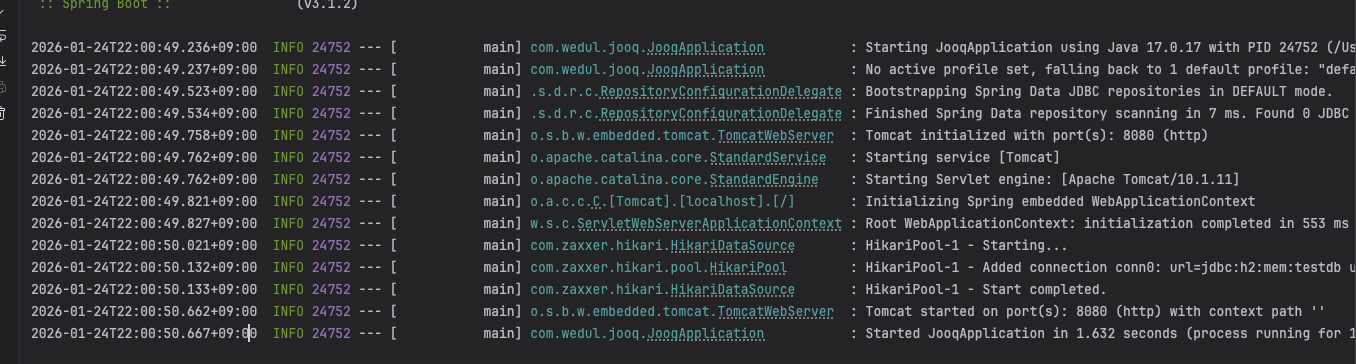
구동은 관련 내용이 워낙 적다보니 약 1초정도로 빠르게 되었다.
그리고 의심이 되었던 aop 관련 pointcut을 execution을 사용해서 2개정도 만들어봤다. (회사 프로젝트는 7~10개정도로 많은 pointcut을 사용하고 있다. 동일하게 execution을 사용하고 있다.)
package com.wedul.jooq;

import org.aspectj.lang.ProceedingJoinPoint;
import org.aspectj.lang.annotation.Around;
import org.aspectj.lang.annotation.Aspect;
import org.aspectj.lang.annotation.Pointcut;
import org.springframework.context.annotation.Configuration;

@Aspect
@Configuration
public class MethodAopConfiguration {

    @Pointcut("execution(* com.wedul.jooq.MemberService.*(..))")
    public void memberServiceMethods() {}

    @Around("memberServiceMethods()")
    public Object around(ProceedingJoinPoint pjp) throws Throwable {

        System.out.println("Method " + pjp.getSignature().getName() + " is called with arguments: ");
        return pjp.proceed();
    }


}

package com.wedul.jooq.request;

import org.aspectj.lang.ProceedingJoinPoint;
import org.aspectj.lang.annotation.Around;
import org.aspectj.lang.annotation.Aspect;
import org.aspectj.lang.annotation.Pointcut;
import org.springframework.context.annotation.Configuration;

@Aspect
@Configuration
public class ControllerAopConfiguration {

    @Pointcut("execution(* com.wedul.jooq.*Controller.*(..))")
    public void memberControllerMethods() {}

    @Around("memberControllerMethods()")
    public Object around(ProceedingJoinPoint pjp) throws Throwable {

        System.out.println("Controller " + pjp.getSignature().getName() + " is called with arguments: ");
        return pjp.proceed();
    }
}
약 18초정도 걸렸다. 확실히 원인은 aop가 맞는 것 같다.
그래서 Aop 대상객체를 판단하는 AopUtils쪽의 canApply 코드를 확인하는데 aop 대상이 맞는지 판단하는 부분에서 엄청나게 많은 시간이 걸리고 있었다.
그 이유는 jooq로 code generate를 하게 되면 굉장히 많은 클래스들이 생성되는데 이 클래스들이 선언된 aop 대상이 되는지를 판단하는 시간으로 사용되어서 클래스 * 메소드 수 * aop pointcut만큼 시간이 걸린것이다.
그래서 이를 해결하기 위해서는 aop대상인지를 판단하는걸 method level까지 내려가지 않고 class filter 레벨에서 판단이 되도록 수정해 줘야한다.
아래는 문제의 그 코드인데 ClassFilter에서 걸러지면 밑에 해당 클래스에 있는 모든 메소드를 뒤져보는 Method Filter 부분을 보지 않ㅇ을 수 있지만 그렇게 하지 못하면 엄청나게 많은 시간이 소요된다.
public static boolean canApply(Pointcut pc, Class<?> targetClass, boolean hasIntroductions) {
    Assert.notNull(pc, "Pointcut must not be null");
    // ClassFilter
    if (!pc.getClassFilter().matches(targetClass)) {
        return false;
    }

    MethodMatcher methodMatcher = pc.getMethodMatcher();
    if (methodMatcher == MethodMatcher.TRUE) {
        // No need to iterate the methods if we're matching any method anyway...
        return true;
    }

    IntroductionAwareMethodMatcher introductionAwareMethodMatcher = null;
    if (methodMatcher instanceof IntroductionAwareMethodMatcher iamm) {
        introductionAwareMethodMatcher = iamm;
    }

    Set<Class<?>> classes = new LinkedHashSet<>();
    if (!Proxy.isProxyClass(targetClass)) {
        classes.add(ClassUtils.getUserClass(targetClass));
    }
    classes.addAll(ClassUtils.getAllInterfacesForClassAsSet(targetClass));

	// method filter
    for (Class<?> clazz : classes) {
        Method[] methods = ReflectionUtils.getAllDeclaredMethods(clazz);
        for (Method method : methods) {
            if (introductionAwareMethodMatcher != null ?
                    introductionAwareMethodMatcher.matches(method, targetClass, hasIntroductions) :
                    methodMatcher.matches(method, targetClass)) {
                return true;
            }
        }
    }

    return false;
}
그럼 어떻게 해결 해야할까? class filter에서 걸릴 수 있도록 이거를 수정해줘야한다. 그렇게 하기 위해서는 메소드 실행 기준을 가지고 있는 execution 대신에 class 타입 기준으로 체크하는 within을 사용해주면 해결할수 있다.
위 두개의 execution pointcut을 아래 within으로 바꾸고 다시실행해봤다.
@Pointcut("within(com.wedul.jooq.MemberService)")
@Pointcut("within(com.wedul.jooq..*Controller)")

1초만에 다시 실행되었다.
관련 issue는 몇가지 git issue에서도 확인이 가능하다. (결론은 aop 범위를 within으로 줄여라..로 이슈는 종결되어있는 것 같다.)
https://github.com/TencentBlueKing/bk-job/pull/2663
https://github.com/jOOQ/jOOQ/issues/5902
jOOQ,spring-boot and aop. · Issue #5902 · jOOQ/jOOQ
Hi, After a migration to jOOQ in an application with the following stack : Java 8 Spring-boot 1.5.1 jOOQ version managed by the boot starter. I had perf issues on startup, after investigation, i fo...
github.com
관련 테스트 코드
'web > Spring' 카테고리의 다른 글
| spring metrics sever, client max-uri-tags (0) | 2026.01.23 |
|---|---|
| swagger OpenApiCustomizer를 사용하여 커스텀 하기 (1) | 2025.05.18 |
| lettuce pipeline코드 사용시 커넥션 풀 사용 필요 (0) | 2024.06.08 |
| spring batch에서 파라미터 시 - 사용 주의 (0) | 2024.05.07 |
| MapStruct의 mapping방식과 Lobmok 함께 사용 시 값이 mapping되지 않는 이유 (0) | 2023.03.27 |

